skip to main |
skip to sidebar
1. Download Stress Test2. Take a look at the user manual.3. Test a static page.Try combinations of stress levels and stress multipliers to simulate 10 users and 100 users.4. Test a dynamic page.Try combinations of stress levels and stress multipliers to simulate 10 users and 100 users.5. Compare the response time of both pages and explain why. 動態網頁:因為靜態網頁的code運算部份較動態網頁來的簡單,故處理速度較快,所能夠承載的負荷較高,回應速度較快。 動態網頁:因為動態網頁的code運算部份較靜態網頁來的複雜,故處理速度較慢,所能夠承載的負荷較低,回應速度較慢。
1. Install Protocol Analyzer Ethereal at http://www.wireshark.org/2. Capture the packets at your Ethernet interface card.3. Enter a login required website that you often go to, such as web mail. Don't use the real account or password.4. Try to catch the packet that contains the password.

1. Go to Laszlo and enter (Laszlo in 10 minutes).2. Study and play around the "drag-and-drop" example.3. Use this method to control movie playing as in the previous lab.4. If you drag and drop the photo to the "play" area, the movie plays.5. If you drap and drop the photo to the "pause" area, the movie pauses.
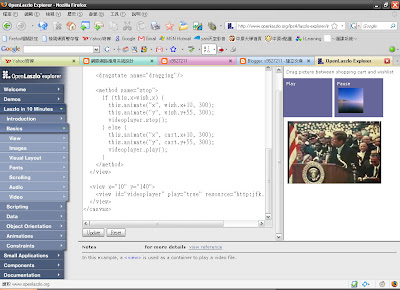
[canvas]
[text x="5" y="5"]
Drag picture between shopping cart and wishlist
[/text]
[view y ="30" ]
[simplelayout axis="x" spacing="5"/]
[view id="cart" bgcolor="#666699"
height="100" width="125"]
[text fgcolor="#FFFFFF"
x="5" y="5" ]Play[/text]
[/view]
[view id="wish" bgcolor="#666699"
height="100" width="125"]
[text fgcolor="#FFFFFF"
x="5" y="5" ]Pause[/text]
[/view]
[/view]
[view x="${cart.x+10}" y="${cart.y+55}"
resource="cd_cover.jpg"
onmousedown="dragging.apply()"
onmouseup="dragging.remove(); stop()"]
[dragstate name="dragging"/]
[method name="stop"]
if (this.x]wish.x) {
this.animate("x", wish.x+10, 300);
this.animate("y", wish.y+55, 300);
videoplayer.stop();
} else {
this.animate("x", cart.x+10, 300);
this.animate("y", cart.y+55, 300);
videoplayer.play();
}
[/method]
[/view]
[view x="10" y="140"]
[view id="videoplayer" play="true" resource="http:jfk.swf"][/view]
[/view]
[/canvas]
1. Go to Laszlo and enter (Laszlo in 10 minutes).2. Study and play around the "scripting" and "video" examples.3. Use this script to control movie playing.4. If you push the "pause" button, the movie pauses.5. If you push the "resume" button, the movie resumes.
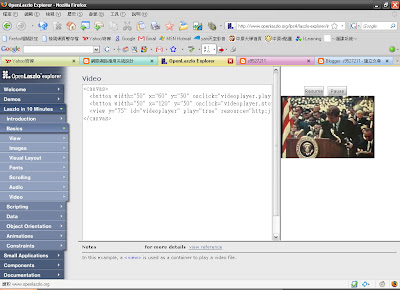
[canvas] [button width="50" x="60" y="50" onclick="videoplayer.play()"]Play[/button] [button width="50" x="120" y="50" onclick="videoplayer.stop()"]Pause[/button] [view y="75" id="videoplayer" play="true" resource="http:jfk.swf"][/view][/canvas]
[Lab]1. Open NVu2. Based on the code as in http://www.scottandrew.com/weblog/articles/dom_4 write a code to generate the table of 9*9 products. (九九乘法表)Hint: The javascript code should be enclosed by script tags. 

1. Given the RSS of Class Blog, write an XSLT fileand use Xray to generate an HTML that contains the titles of items in the RSS.2. Open the XML file by Word and you will see the document structure.3. View the formatted HTML file.
W3C Link Check 可以檢查 dead links, 而且只要輸入首頁, 就可以依據指定深度自動向下檢查, 而且也可以檢查對外連結(外站). Link Checker 首先要設定檢查深度(Check linked documents recursively, recursion depth=?), 如果沒有設定, 它就只有檢查首頁. 因此如果出現 deadlink, 就是在首頁. 如果你設定檢查深度, 它就會逐一檢查此深度內的每一頁, 在檢查某一頁開始時, 它會先顯示現正在檢查的 URL, 然後 在逐一爬行該頁內每個 link. 報表輸出很漂亮. 請參閱 http://validator.w3.org/checklink 請檢查三個你最常使用的網站, 看看連結的品質如何? 紀錄有錯誤連結 (HTTP Error 404) 的次數.
Yahoo!拍賣

重灌狂人

綠色工廠

Hand code a HTML or use Nvu to edit an HTML so that the webpage can send a request to Google like http://maps.google.com/maps?q=24.9586,+121.24114 Use Form CGI that includes action, input, and submit. Try a few different coordinates.


Check it out! Real time satellite tracking
It is a mashup of Google Map and satellite teacking data.
Use the website to track Formosa III satellite.
More applications of Google Maps

For housing services, compare the three websites
http://www.housingmaps.com
http://www.urmap.com.tw/asp/kijiji/
http://www.7house.com.tw
List the differences in the user interface design and usability. Make comments
by your use experiences.
比較: 美感,直覺性,流暢,預期反應
example: TMM
<============================================================>
就美感而言
我覺得 7house 做的最美
也許是因為房屋仲介的關係
較美的視覺感較易吸引到顧客
而就直覺性而言
我覺得 housingmaps 最直覺
也許是因為它都沒有分類
很直接直覺地把哪個地方有租屋、售屋的在地圖上點出來
並且加以簡述
如此一來對於區域性地區有特殊需求的人來說
會是個不錯的選擇
而就流暢度而言
我覺得大致上各站都還算滿流暢的
至少資訊都還算充足
較不會有找不到所要條件的情形發生
而就預期反應來說
我覺得 housingmaps 帶給我的預期反應最好
因為他不僅可設定細項條件
而且在介紹方面圖文交錯
且操作相當簡單便利
1. Upload a sample ppt to Google Docs.2. Publish the uploaded ppt.3. Embed the online ppt to your blog.The reason to do so is that the readers don't have to have ppt to view your presentation. For example, some users work with Linux or Unix, and others work with MacOS. They will appreciate you for doing so.Hint: a sample work





 發表文章
發表文章


